
Rapid File Defragmentor
1.4 build 686
Size: 655.36 KB
Downloads: 5057
Platform: Windows (All Versions)

Every hard disk gets fragmented from time to time, meaning that the data stored on it is not correctly placed, leading to performance problems. That's why it's essential to defragment the hard disk or certain files once in a while, for ensuring a normal working operating system. Windows features a tool for defragmenting the hard disk, but unfortunately, it's not that good and doesn't do this efficiently. A much better idea would be to use a 3rd party application for defragmenting the hard disk and its files and folders. One such application is Rapid File Defragmentor.
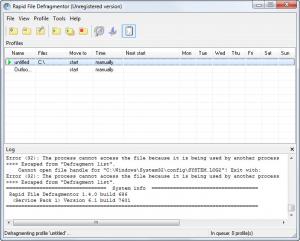
The difference between this simple Windows application and other similar programs is the possibility to defragment only certain files and folders, thus saving a lot of time, especially if we are talking about a large hard disk with a lot of information stored on it. When running the program, the user must first create a defragmenting profile, which involves entering a name and selecting the files and folders that should be targeted. In case one doesn't know which files and folders are fragmented, he can use the special program feature that automatically scans all the files and folders stored on the hard disk and points out the ones that are fragmented.
At this point, the user can choose to defragment only those files. Rapid File Defragmentor allows adding an unlimited number of profiles and running all of them automatically, one by one. Using the options section, one can configure the application to automatically start together with Windows and can also schedule a defragmentation process, ensuring that the system will work at maximum performance all the time.
Pros
It allows creating an unlimited number of defragmentation profiles, each having its own files and folders targeted. Besides that, it can scan a partition for fragmented files and folders and can take care only of those items. Furthermore, the program can be set to start together with Windows and to defragment the hard disk at certain periods of time.

Cons
The program cannot display the fragmentation level in a graphical way, like other similar programs and that's why some users may have trouble viewing the fragmentation level. Rapid File Defragmentor can defragment the hard disk or specific files and folders with great ease, thus ensuring maximum system performance.

Rapid File Defragmentor
1.4 build 686
Download
Rapid File Defragmentor Awards

Rapid File Defragmentor Editor’s Review Rating
Rapid File Defragmentor has been reviewed by Jerome Johnston on 01 May 2012. Based on the user interface, features and complexity, Findmysoft has rated Rapid File Defragmentor 4 out of 5 stars, naming it Excellent







